Finding courses
CourseSearch is VTAC's main resource for course research. You can search for courses by keywords such as course names, codes, qualifications, majors, institutions or campuses. You can also search or refine by institution, estimated ATAR, qualification level, study mode, area of interest, applicant type or application method. If you are researching 2027 courses, use CourseSearch.
How to research courses
It's important to get started on researching courses as soon as possible, as it takes time. Try to have most of your course research completed before September. Research careers, visit the institutions you are most interested in, and research courses and make a shortlist. You should also familiarise yourself with the types of courses and qualifications.
Course updates
The course updates page provides a summary of changes to courses, including new courses, cancelled courses and restructured or renamed courses.
Institutions make course changes regularly so make sure you keep an eye on this page for any courses in your preference list that are cancelled or amended. Also look out for any new courses that you may want to add to your list.
How to use CourseSearch
CourseSearch is a powerful search tool and contains essential information needed during the course application process. This includes the essential requirements and admission criteria, including prerequisite studies, required for entry into each course.
The information on this page is also available as a How to use CourseSearch fact sheet (PDF) that you can download.
Discover courses
Keyword search
When you go to CourseSearch, the first thing you'll see is a text box to search for keywords and a list of filter options. You can start a search by typing in a keyword or more than one search term, separated by a space—CourseSearch will look for all of them.
As well as searching for your keyword in the course title, qualification level and major studies (area of specialisation) fields, CourseSearch will search the fields for the name of the institution and campus. So, searching for “commerce Melbourne” will bring up results where the words “commerce” and “Melbourne” are found in these fields
Filter courses
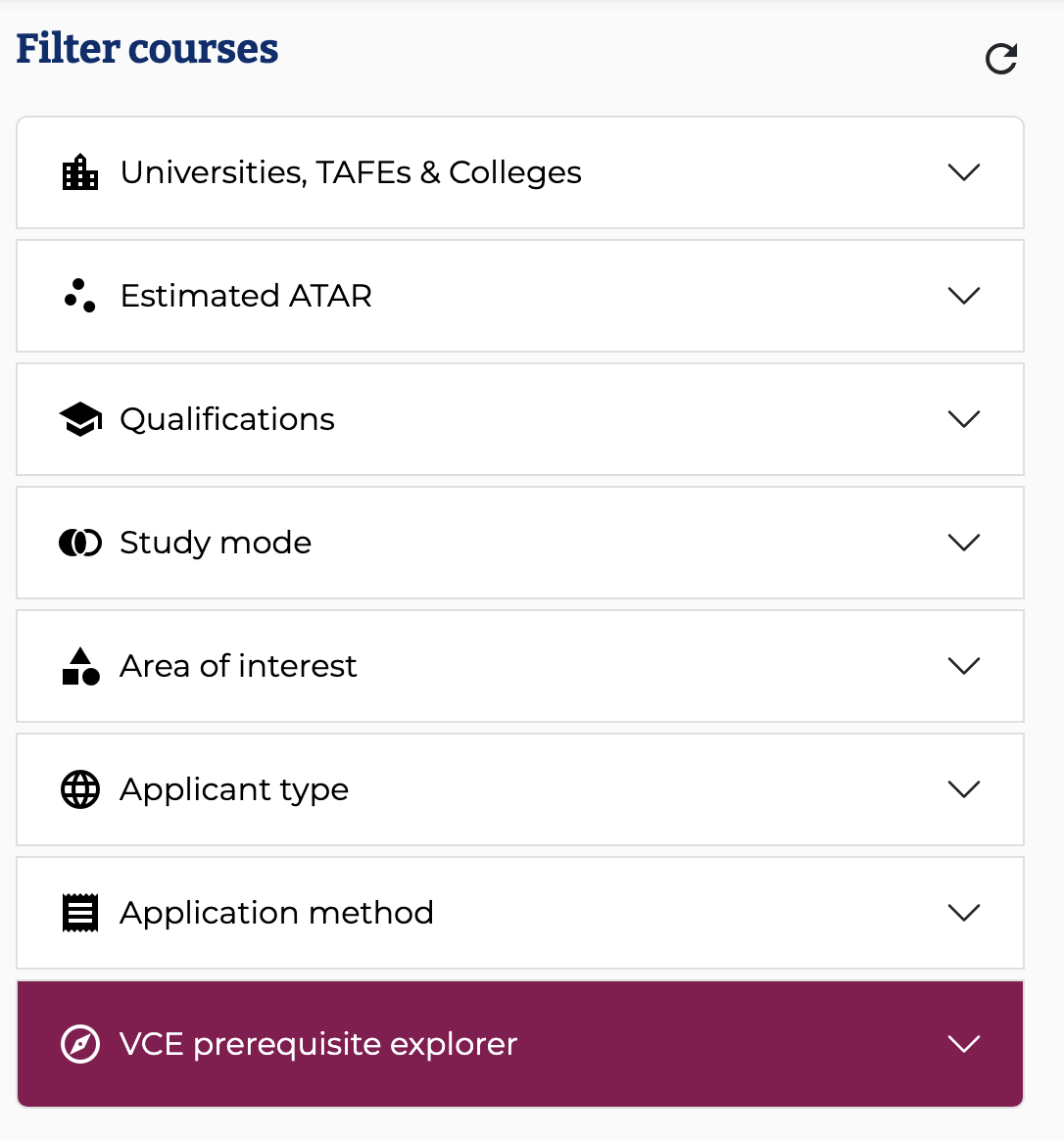
The 'filter courses' list of options can be used in conjunction with a keyword search to narrow down your search results. Alternatively, you can start a search using one or more filter without using the keyword search.
How to refine your search results
- You can refine your results by University, TAFE or College.
- You can refine results based on what ATAR you expect to receive or received by using the Estimated ATAR range filter.
- You can specify the qualification level you are searching for.
- Use the Study mode filter if you want to find courses that offer the option to study part-time or online.
- If you want to browse a broad range of related courses, you can use the Area of Interest drop-down menu.
- There is the option of refining your results by whether courses are available to domestic students and/or international students.
- You can also filter by whether you apply for the course through VTAC, or direct to the institution—by default, CourseSearch will show you both application methods.
- If you're a student in Years 10-12 you can use the VCE prerequisite explorer tool to find courses you are eligible for based on your existing Unit 3 and 4 VCE study program (Year 12 students) or a planned Unit 3 and 4 VCE study program (Year 11 and 10 students). For more information, see How to use the VCE Prerequisite Explorer in CourseSearch.
Understanding course results
Each course result shows the course title, qualification and minimum duration, and institution and campus.
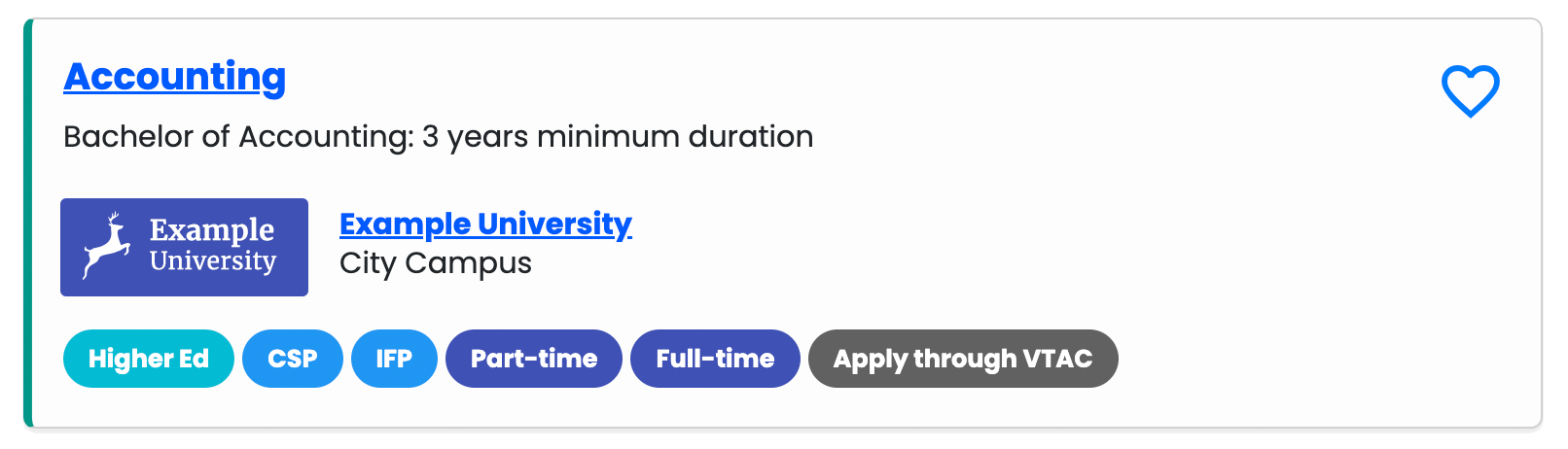
There are also a range of tags at the bottom of each result that provide important information about the course.
For a full explanation of the different fee types, qualification levels and study modes, see Course codes and fee types.
Qualification level
 Higher education: undergraduate qualifications that include bachelor degrees and associate degrees
 VET (Vocational Education and Training): qualifications that include Certificate II, Certificate III, Certificate IV, Diploma and Advanced Diploma.
 Graduate entry qualifications that includes all courses that require an undergraduate or VET qualification and/or relevant work experience as a prerequisite
Fee-types
 CSP (Commonwealth supported places): the Australian Government pays part of the course fees
 DFP (Domestic fee places): you pay the full course fees
 IFP (International fee places): you pay the full course fees
 VFP (Fee Type determined by provider): VET courses where you may be eligible for government support but otherwise you pay full fees
Study mode
 Full-time courses can be anything between 12 and 35 contact hours (i.e. hours in tutorials and lectures) per week
 Many courses can be studied part-time.
 Courses that have an online option rather than studying at the campus.
How to apply
 You apply for these courses using the VTAC course application. You will need to sign up for a VTAC account.
 Courses with Apply direct in their VTAC listings. Each institution has its own application procedures. You can apply for these courses directly to the institutional website from the 'Apply to institution' button on the course page in CourseSearch.
A number of private tertiary course providers list their courses with VTAC, but manage their own application and offer processes. Similarly, a number of traditional VTAC institutions that offer their undergraduate courses through the VTAC process have also listed a number of postgraduate courses for which graduates can apply directly to the institution.
Create a course shortlist
If you've gone through a list of courses and find a course you are interested in, you can add it to your favourites by clicking on the 'heart' button next to the course name. This saves the course in your browser. To view, email or remove courses from your favourites list click on “View Favourites' found on the top right hand of the page.
Understanding course descriptions
Course descriptions contain important information that you will need to understand to determine whether the course is right for you. When you view a course description you will see the following information.
Reading a course entry
The following explains all the sections of a course description page.
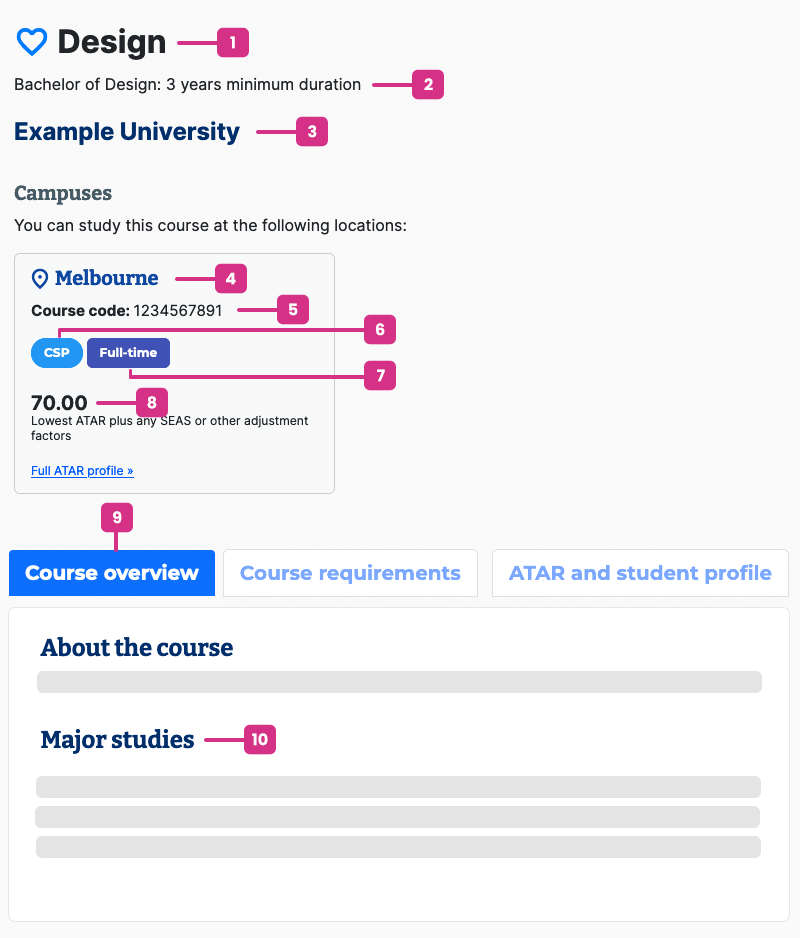
1 Course title
The course title tells you the area of study.
2 Qualification/award name and minimum duration
Qualification/award name
The qualification/award name is the formal title of the course including the level of study (e.g. Certificate, Advanced Diploma, Bachelor's degree). However, it is really important to look beyond the title when researching a course, to ensure it meets your expectations.
Minimum duration
The minimum duration is the shortest time in which you can complete the course. Often this is as a full-time student. For parttime students it will typically take longer.
3 Institution and campus
This tells you which institution the course is offered by.
4Campus
The campuses that the course is offered at. Some institutions have campuses all around Victoria, so as a part of your research, make sure you're able to get to/move to the campus.
5 Course codes
Every course that accepts applications through VTAC has a VTAC course code. Some have more than one. These codes are extremely important when applying for courses because the course code is specific to each course, institution, and campus. You find them in course entries on CourseSearch and you will use them when you apply and complete your course preference list.
Why do some courses have no course codes?
If the course information does not include any VTAC course codes, it means they accept applications directly to the institution (not through VTAC).
6 Fee types
Fee types tell you if the course is government subsidised or if you are liable to pay for the entire course. Fee amounts can vary dramatically so this is a big thing to consider as a part of your research.
What are the fee types?
The last digit of the course code (1, 2, 3 or 4) shows you the type of course fees you will be required to pay if you get an offer:
- codes that end in 1 are government-supported university places, so you only pay part of the cost
- codes that end in 2 are domestic full-fee places, so you pay the full cost
- codes that end in 3 are international full-fee places, so you pay the full cost
- codes that end in 4 are VET courses. You may have to pay full fees or you may be eligible for a government-funded place. If you are finishing year 12, you will usually be eligible for a government-funded place. Contact the institution for more information
For further information, see Course codes and fee types.
7 Study mode
This tells you if the course is offered on a full-time and/or a part-time basis. Some courses will be restricted to one mode or the other.
8 Lowest ATAR plus equity schemes and other adjustment factors
This was the minimum ATAR (includes adjustments made for equity schemes and any subject adjustments if applicable to the course) needed to have been made an offer for the course up to the main January selection period (if course requirements including prerequisites were also met).
This will only be listed in the course entry if the course used the ATAR as part of their selection process.
9 Course overview
The course overview gives you a summary of the course, and subsections may include professional accreditation, course fees, career opportunities, pathway options and other additional information. However, this is just an overview—to thoroughly research the course visit the institution's webpage and visit the campus to learn about the course structure and subject offerings.
10 Major studies
Major studies are the areas you can specialise in. Note that courses with the same name may offer different major studies.
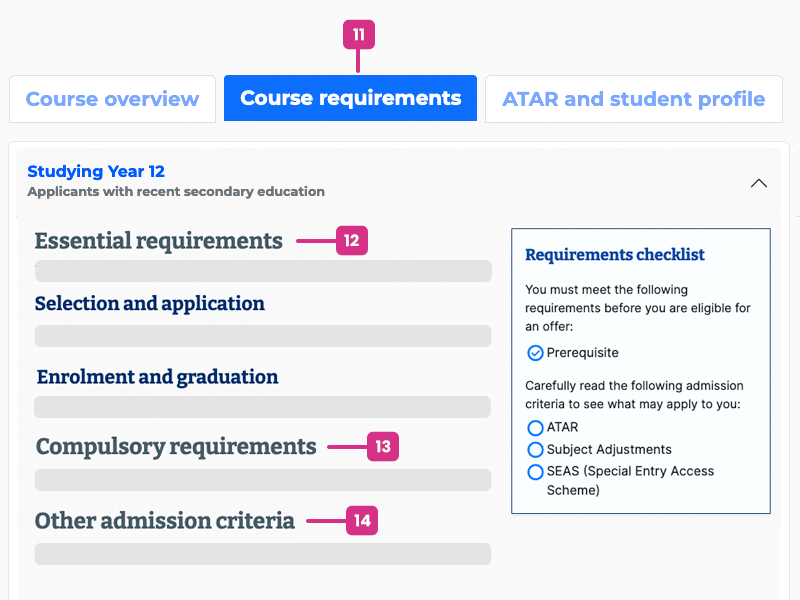
11 Course requirements
Select your applicant category
A course may have different essential requirements and admission criteria for applicants depending on your educational history and work/ life experience. If you are studying and aiming to complete Year 12 this year, choose the Studying Year 12 category. If you are in Year 11 or Year 10 you can also select this category to see the prerequisite studies required for the year you intend to commence the course, and for an idea of requirements and criteria to expect. Be aware these requirements and criteria may change between years.
Essential requirements and admission criteria
This is where you will find prerequisites and other requirements and criteria you must meet to be eligible for selection into a course.
12 Essential requirements
Essential requirements are criteria for a course that are compulsory for all applicants.
Essential requirements for selection and application must be completed to be considered for selection into the course.
Essential requirements for enrolment or graduation are advisory: they are not required for selection, but the course requires them for enrolment or completion of the course. These will need to be completed before enrolling or during the course. For example you may be required to complete a first aid certificate before enrolling or a police check before a work placement.
13 Compulsory requirements
Compulsory requirements are criteria for a course that are compulsory for the certain applicants. For example, a prerequisite study may be compulsory for year 12 students but not for applicants that have started a bachelor degree.
14 Other admission criteria
Admission criteria details what will be considered when selecting applicants for entry into a course. These may only apply to certain types of applicant, or may not be compulsory. Read these requirements carefully to discover what may apply to you.
Requirements checklist
The 'Requirements checklist' summarises the essential requirements and other admission criteria for the applicant category you have chosen and also tells you which ones are compulsory.
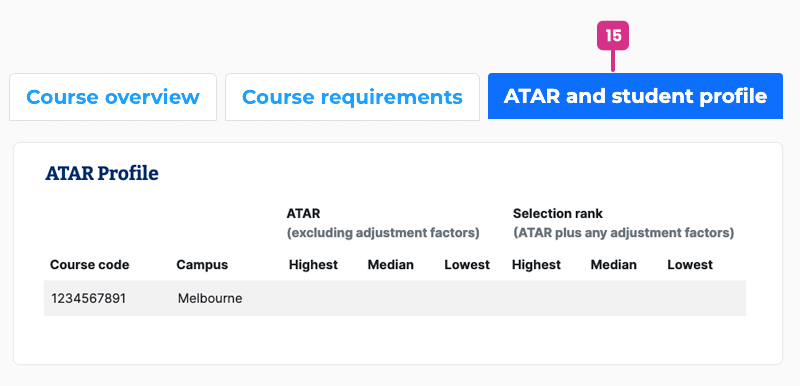
15 ATAR and student profile
ATAR profile
Courses that use the ATAR in selection publish an ATAR profile. This is a summary of selection data from the previous selection round.
The profile shows the highest, median and lowest ATARs of applicants to whom offers were made: firstly for the 'raw' or unadjusted ATAR before any adjustments such as equity schemes and subject adjustments are applied, and secondly for the selection rank—the ATAR after adjustments are applied.
The ATAR profile displayed on VTAC CourseSearch entries is the data for the main offer round in January. Institutions may also publish further tables on their websites, which adjust the profiles based on subsequent offers made through VTAC or directly to the institution.
Courses which make a small number of offers based on the ATAR will publish “L/N” (low number) or “<5 offers” instead of numeric data to protect the privacy of those applicants. For courses which do not use the ATAR in selection, you may see an “N/P” or “–” (not published) indication.
The piece of data in an ATAR profile that is most useful to applicants is the 'lowest selection rank'. This represents the minimum selection rank (ATAR or adjusted ATAR) needed to have been sure of selection into that course in that selection period (if course requirements including prerequisites were also met).
The ATAR profile provides an array of other data that you can read about in The ATAR profile explained fact sheet.
Student profile
The student profile details the number and percentage of students who commenced the course in the most recent intake, to provide you with an indication of the likely peer cohort of new students.
Other information on the course page
There are two other tabs that contain additional information
How to apply
Most courses in CourseSearch require an application through VTAC, but some require you to apply directly to the institution, this section will provide information on how to apply for the course.
Further information
You can obtain more information about the course and institution through the websites listed under 'Further information'.